
Give the agent a goal.
Get back reviewed work.
oh-my-t3code adds plans, roles, task briefs, and review loops to the agents that you run in T3 Code. The agent splits the goal into units, sends each unit to a model as a T3 child task, and then reviews and verifies the result.
npx omt3- Goal: ulw add OAuth to the API, an example goal
- Plan: the agent splits the goal into three units
- Delegate: each unit goes to a model as a T3 child task
- Review: Codex reviews Claude's work, and Claude reviews Codex's work
- Verify: each unit is checked
- Done: the three units merge
Install
npx omt3Runs omt once with no install.bunx omt3Runs omt once with no install.npm i -g oh-my-t3codeInstalls the omt command. Needs Node 22 or later.mise use -g github:gabimoncha/oh-my-t3codeInstalls the release binary. Needs no Node.
Then install omt into your project
cd /path/to/your-project
omt install --project --hooks
omt doctor --projectThe install lists the files that it will write and asks before it writes them.
--hooks adds the ulw keyword to Claude Code. If you use only Codex, leave --hooks out.
Restart the T3 agent sessions of the project. A running session does not load new skills.
The install guide shows the other channels and the uninstall.
Names
oh-my-t3code- The project, the GitHub repository, and the npm package.
omt- The command that every install gives you.
omt3- The same npm package under a short name, for one-shot runs.
How it works


1 Give a goal
In a T3 thread, type
$omt-ulw add rate limiting to the public APIWith the Claude Code hook, ulw alone works.
2 Plan
The agent reads the code and writes a plan in .omt/plans/, split into units. Each unit has a role, a file scope, a done condition, and a verify command.

3 Delegate
The agent sends each unit to a model as a T3 child task. Each child task is a T3 thread, so you can watch it in T3.

4 Review
In the default profile, Codex reviews Claude's work, and Claude reviews Codex's work.

5 Verify and report
A large run also verifies each unit, and a final review checks the whole change.

Done
The states of one unit
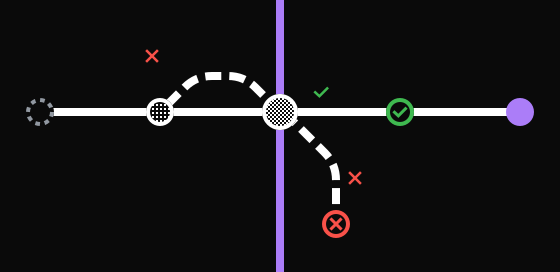
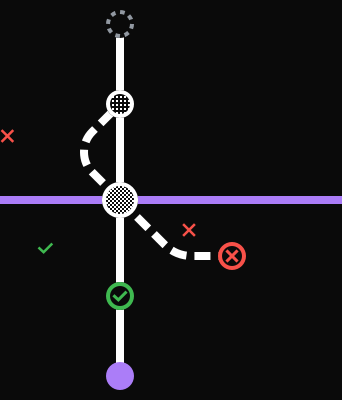
- Planned, then delegated, then in review.
- In review, approve: the unit is verified, then done.
- In review, request changes: the unit goes back to delegated for a fix.
- In review, block: the unit is blocked until the plan changes.
Two parts
The skills tell the agent how to plan, delegate, review, and verify.
The omt CLI does the steps that must give the same result each time: it merges the config, picks a model for each role, writes the task briefs, and counts the tasks in the ledger.
The CLI has no runtime dependencies, makes no network calls, and sends no telemetry.
You can read the plan, the task count, and each review verdict in files under .omt/.
.omt/plans/- The plan of each run, split into units.
.omt/ledger.jsonl- One line for each task start and each result.
.omt/config.jsonc- The profile: the models, the checks, and the limits.
A plan and its ledger stay in .omt/ after context compaction and across sessions, so one plan can run for days.
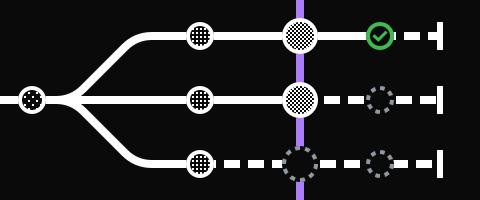
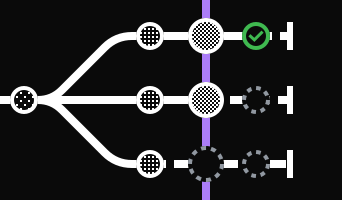
From the walkthrough of two real runs on the omt repository, one station per unit:

One run had 4 units and used 29 child tasks in 2 hours 20 minutes.

The other had 10 units and used 128 child tasks over 5 days.
Skills
The agent can start these six itself
omt-ulw- You want a task built, fixed, or shipped from start to end. The ulw and ultrawork keywords start it.
omt-plan- You want a reviewed plan before any code changes.
omt-design- You want designs or mockups before UI work.
omt-review- You want a review of uncommitted changes, a branch, a commit, or a pull request.
omt-research- You need an answer with sources from the repository, library docs, or the web.
omt-show- You want to see a plan or a status as a page with flowcharts and tables.
You start these three by name
omt-swarm- You have independent tracks, and each needs its own worktree thread and pull request.
omt-loop- Work must continue across turns until a check passes.
omt- You want the list of workflows and CLI commands.
Who it is for
Use omt if
You use T3 Code and want an agent to plan and finish work that has several steps. With both Claude Code and Codex, Claude and Codex review each other's work.
Do not use omt if
- You do not use T3 Code. The skills start child tasks with the T3 delegate_task tool, and only a T3 thread has that tool.
- You want a quick edit with no plan and no review. omt runs its full loop also for small tasks, and each unit costs about 5 child tasks.
- You want a hosted service or a scheduler that runs in the background. omt has neither.
Requirements
- T3 Code v0.1.0 or later.
- Claude Code, Codex, or both, enabled in T3 under Settings > Providers. Design and UI work needs Claude Code.
- git.
- Node 22 or later for the npm package. The release binary needs neither Node nor Bun.
This is version 0.1. The config format and the CLI output can change.
Credits
oh-my-t3code uses ideas from oh-my-openagent (fallback chains, the ultrawork loop, plan reviews), oh-my-pi (model roles and the review recipe), and T3 Code (orchestrator v2, which runs the child tasks). It copies no code or prompts from oh-my-openagent.
Run omt once, with no install.
npx omt3